
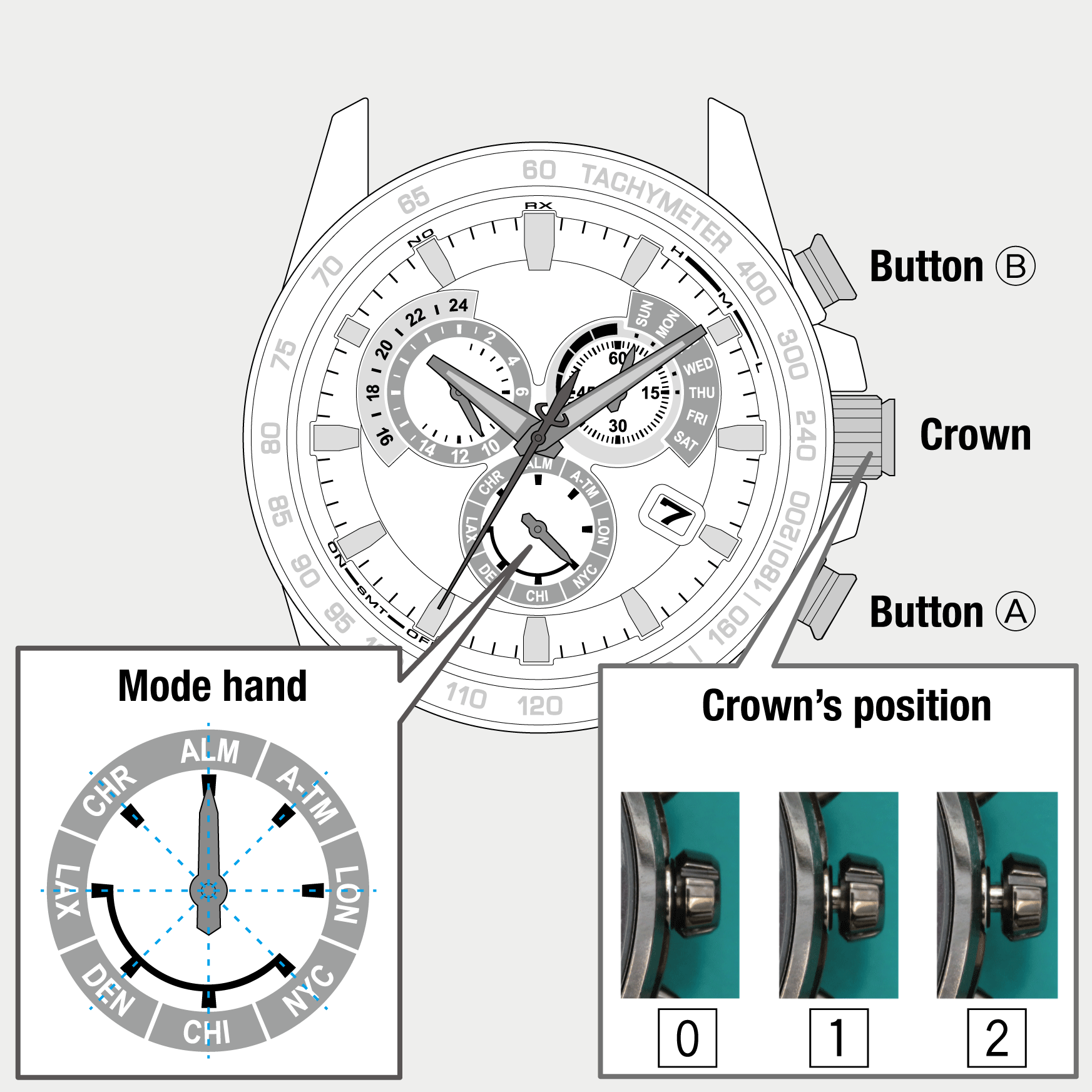
 Cal. No. E650
 Refine your search
E650
Alarm
Changing alarm setting
- Pull the crown out to position 1.
- Rotate the crown to change the mode to [ALM].
- Pull the crown out to position 2.
- Rotate the crown to set the alarm time.
- Press and release the upper right button B to set the alarm setting to “ON”.
- Pull the crown out to position 1.
- Rotate the crown to change the mode to any one of the following: [LON], [NYC], [CHI],[DEN] or [LAX].
- Push the crown in to position 0 to finish the procedure.
The second hand points to 30 seconds and stops.
The hour, minute and 24-hour hands Indicate the alarm time currently set.
!
The second hand shows the alarm setting (ON/OFF) while the hands are moving to indicate the alarm time and moves to point 30 seconds after that.
The second hand indicates the alarm setting (ON/OFF).
!
Check AM/PM referring to the 24-hour hand.
!
If you rotate the crown quickly a few times, the hand will move continuously.
To stop the rapid movement, rotate the crown in either direction.
!
Each time you press the button, the alarm setting changes alternately.
The second hand points to 30 seconds and stops.
The watch returns to normal indication.